
-22%3
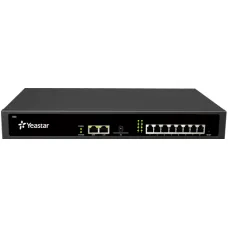
Yeastar S50 IP PBX
Model: S50
More from Yeastar — IP PBX SystemsBefore discount30,000 EGP
After discount25,000 EGP-17%
You save 5,000 EGP
A powerful and flexible IP PBX system designed for small and medium-sized businesses, offering reliable voice communication, advanced call management, and seamless integration with IP phones.
Quantity
- Quote on request
- Site survey & design
- Professional installation
- Technical support
Yeastar S50 IP PBX — Specifications
| Users | 50 |
|---|---|
| Max Concurrent Calls | 25 |
| Max FXO/BRI Ports | 8 |
| Max FXS Ports | 8 |
| Max 3G/4G Ports | 4 |
How to connect
Connection diagram and installation steps.
- 1Install the Yeastar S50 in a suitable and secure location.
- 2Connect the device to the power supply.
- 3Connect the LAN port to the network switch.
- 4Connect IP phones to the local network.
- 5Access the PBX web management interface.
- 6Configure the network settings and IP address.
- 7Create user extensions and assign extension numbers.
- 8Configure SIP trunks for external telephone connectivity.
- 9Set up inbound and outbound call routing.
- 10Configure voicemail, call forwarding, and call groups.
- 11Register IP phones using their assigned SIP credentials.
- 12Test internal and external calls to ensure proper operation.
Overview
The Yeastar S50 IP PBX is a business communication system designed to provide efficient and reliable telephony services for small and medium-sized organizations. It supports VoIP technology, extension management, SIP trunk connectivity, call routing, voicemail, call forwarding, conference calls, and advanced call management features. Its flexible architecture makes it suitable for businesses looking to improve communication and streamline daily operations.
Request a Quote
Tell us what you need and our team will reply with availability and pricing.